Powerful Keyboard Shortcuts
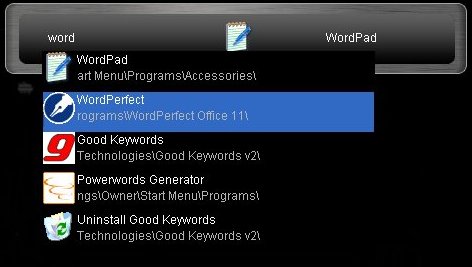
Being the productivity junkie that I am, I am addicted to any and all keyboard shortcuts. I have recently been introduced to two new programs that allow you to create your own keyboard shortcuts and launch programs with the click of a button.
They are known as Launchy and AutoHotKey.
Launchy is a smart search program, which tries to guess which program or file you are looking for. Simply start typing and Launchy will automatically begin trying to find the appropriate file or program. Once you have found the correct program, hit the enter key to launch it.
Launchy is an excellent tool for finding programs and files without having to search through the start menu or hunt through different folders scattered across your hardrive.
Launchy will automatically run every time you start up your computer. However, it hides in the background until you need it. To bring the toolbar into view, hit alt+space (hold down the alt key and tap the space bar).
Launchy also has a number of plugins that you can download for additional features. These allow you to:
- build and run custom commands
- perform web searchers with the following search keywords: Google, MSN, Yahoo, weather, Amazon, Wikipedia, dictionary, thesaurus, imdb, Netflix, and msdn websearch
- search all of your FireFox bookmarks
- and much more…
You truly have to try this program out for yourself to discover it’s smart searching powers. Take this time-saver for a spin at Launchy.net.
AutoHotKey is another one of my favorite newfound applications. When it comes to raw power, it doesn’t get much better than AutoHotKey. This software can automate just about anything by capturing your keystrokes and mouse clicks.
AutoHotKey is a bit more technical than Launchy, but it’s well worth the learning curve. Fortunately, this application does come with a built-in macro recorder.
You can use AutoHotKey to launch programs, crank through your email, and automate repetitive tasks.
Check it out at AutoHotKey.com.